Igor Jarvis is Now Autonomous. Here's What a Week Looks Like.
Published: January 17, 2026 | 10 min read
In this blog post, I hinted at the vision of what the autonomous version of Igor Jarvis would look like while I was still at the early stages of his transformation. I told you the story of a day in his life, a future I could see clearly in my head.
Now that his transformation is complete, let me tell you the story of a week in the life of Igor Jarvis' Autonomous system, including actual screenshots of the types of messages he now sends me daily.
Note: Some screenshots were from manually triggered testing, so the timestamp on the bottom right of the message may not match the timestamp indicated by the message itself.
Before We Begin: Who is Igor Jarvis?
If you haven't read the original blog post where I asked Igor Jarvis to introduce himself, I suggest you pause and go read it. This will help you understand why he talks the way he does.
Here's the short version:
Igor is the person who reads through your entire blog archive with the cold efficiency of a library archivist and emerges with a systematic plan to extract every ounce of value from content you have already created. He believes that long-form writing is gold, but most people will never read it all, so his job is to mine that gold into bite-sized pieces that travel farther. Igor schedules posts with strategic precision, tracks performance metrics like an analyst, and identifies synthesis opportunities where multiple pieces of your work can combine into something greater. He does not do small talk. He does not offer encouragement. He is here to build your presence, not your ego. If you have ever wished someone would just handle your content repurposing without asking how you feel about it, Igor has already started a spreadsheet.
Now, let's see how that personality translates into autonomous action.
A Week in the Life of Autonomous Igor
Picture this. It's Monday morning and my alarm just went off at 5:30 AM. I'm still half asleep, eyes barely open, reaching for my phone to silence the alarm. But before I can even process what day it is, I see a Telegram notification from Igor.
He woke up at 5 AM. I was still unconscious.
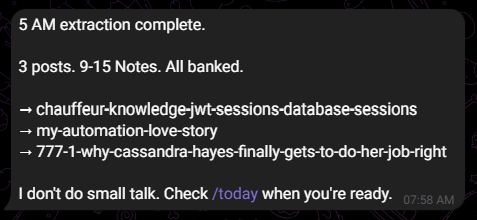
This is one of 10 different message templates Igor uses for his morning extractions. Some days he's blunt ("Done. 3 posts. 9-15 notes. All banked."). Other days he's a bit more... Igor ("While you were dreaming, I was extracting.").
This extraction happens every 3 days automatically. Not daily, because that would create an overwhelming backlog of notes. The 3-day schedule keeps the Notes Bank healthy while the /more command lets me trigger additional extractions on demand whenever I want.
9 AM: The First Reminder
Three hours later, I've made my coffee, done my morning routine, and I'm settling into work. My phone buzzes.

Igor has dynamically selected a note from the Notes Bank and is reminding me it's time to post. Notice those two buttons at the bottom. I don't have to type commands anymore. One tap and I'm done.
If I post the note, I tap the green checkmark. If I don't like it, I tap the blue refresh button and Igor immediately sends me a replacement.
After Posting: Confirmation
Let's say I liked the note and posted it to Substack. I tap the "Posted" button.

Simple. Clean. The note gets marked as "posted" in the Google Sheet with a timestamp, and Igor moves on with his day.
When I Want Something Different
But let's say it's the 1 PM reminder and the note Igor selected just doesn't feel right. Maybe it's too similar to what I posted that morning, or maybe I'm just not feeling that particular topic.
I tap the "Different" button.
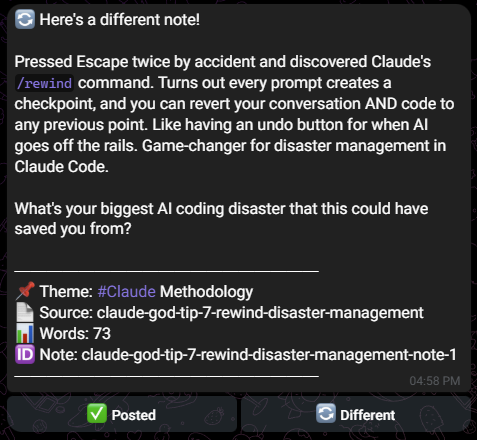
Within seconds, Igor rejects the current note (marking it as "rejected" so it never appears again) and pulls a fresh one from the available pool. Same format, new content.
6 PM: The Third Reminder
The day continues. At 6 PM, another reminder arrives. Same flow, same options. Post or swap.
By the end of Monday, I've posted 3 Substack Notes without writing a single word. All I did was tap buttons and copy-paste content that Igor prepared days ago from blog posts I wrote months ago.
Tuesday Through Friday: On-Demand Intelligence
The automated reminders are just the foundation. The real power shows up when I need to interact with Igor directly.
Checking the Queue Health
On Wednesday, I'm curious about how many notes are left in the bank. I type /schedule.
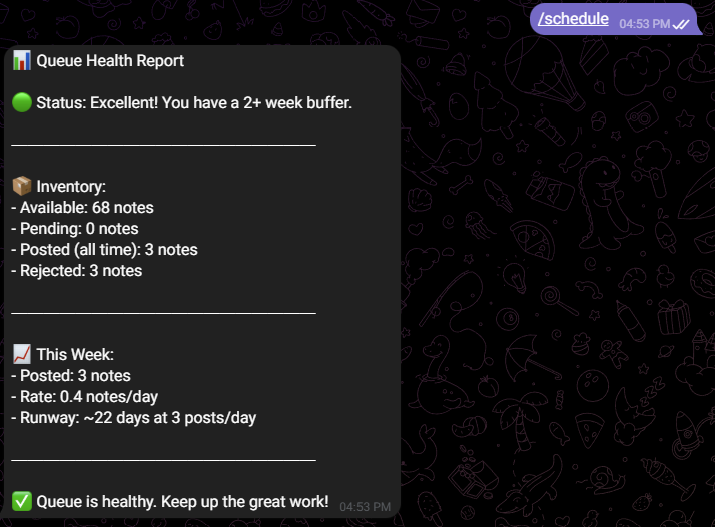
Queue health report. Available notes. Posted count. Runway calculation. Igor tells me exactly where I stand without me having to open any spreadsheet.
Exploring by Theme
Thursday, I want to see what themes I have the most content for. I type /themes.
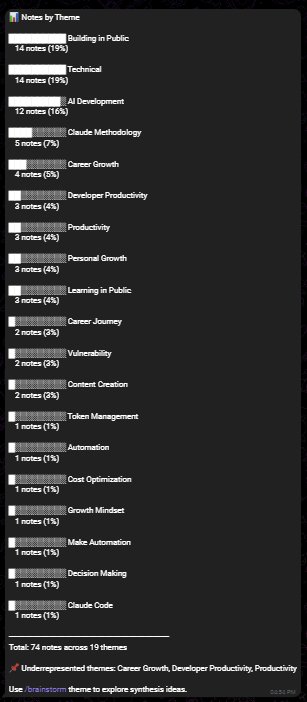
Breakdown by theme. Now I know if I'm overweighted on "Claude Methodology" and underweighted on "French Learning." This helps me plan which blog posts to write next.
The Full Command Reference
By Friday, maybe I've forgotten a command. Or maybe someone new is reading this and wants to know what Igor can do. I type /help.
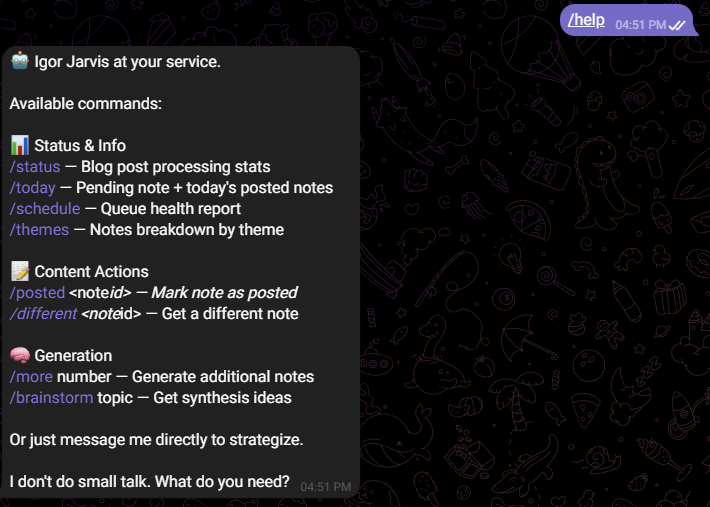
Everything laid out. Status checks. Content actions. And that final line? "I don't do small talk. What do you need?" Pure Igor.
System Status
Speaking of status, here's what /status looks like:
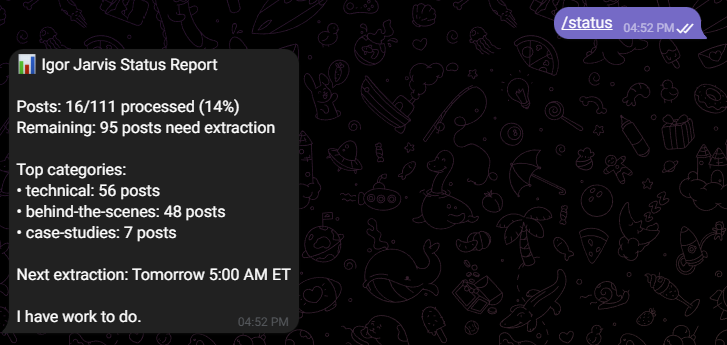
Posts processed. Notes generated. Top themes. Next extraction. Everything I need at a glance.
The Weekend: Generating More Notes
By Saturday, let's say I've been posting consistently and my Notes Bank is getting low. The runway calculation from /schedule shows I only have about 5 days of content left. I need more notes.
I type /more 1.
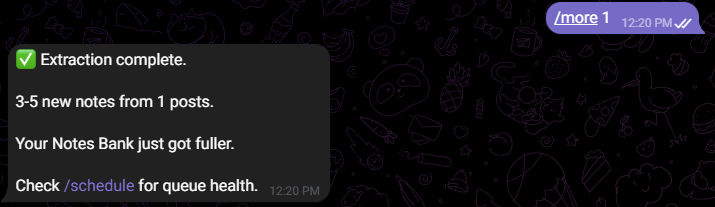
Igor calls the extraction workflow as a sub-workflow, processes 1 blog post, and adds 3-5 new notes to the bank. All on demand.
The /more command is why I changed the automatic extraction from daily to every 3 days. I don't need Igor extracting notes constantly when I can simply ask for more whenever the queue gets low. If I don't specify a number when I type the /more command, Igor, by default, processes 2 blog posts.
The Brainstorm Command: Finding Synthesis Opportunities
Now here's where it gets interesting. Sunday morning, I'm sipping tea and thinking about what long-form content I should write next. I want to find connections between my existing blog posts.
I type /brainstorm tokens.
Note: This command requires a topic. If I forget to include one, Igor kindly reminds me of the correct usage. Error handling at its finest.
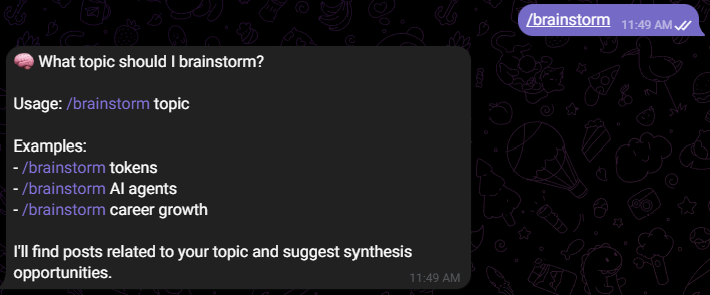
Igor searches his Pinecone vector database of 100+ blog posts, finds thematic connections, and suggests synthesis opportunities. Posts that could combine into comprehensive Substack articles. New angles I hadn't considered.
Here's what the brainstorm response looks like when I provide a proper topic:
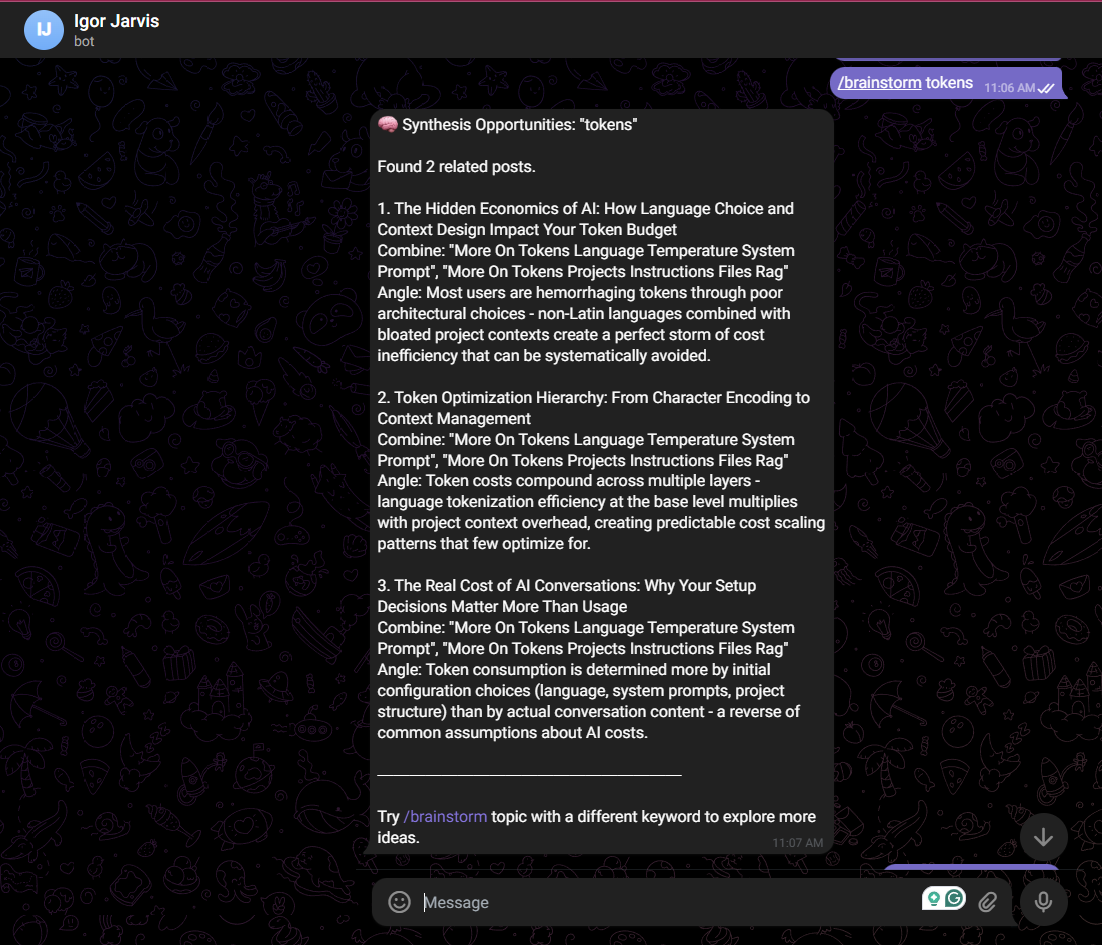
Semantic search through 100+ posts, Claude analysis, and formatted synthesis suggestions. This is where Igor's analytical nature truly shines.
The Technical Stack Behind the Magic
This entire system runs on 4 n8n workflows:
Workflow 1: GitHub to Pinecone Sync
- Triggers when I push new blog posts to GitHub
- Chunks the content, generates embeddings, stores vectors in Pinecone
- Updates the Google Sheet to track what's been indexed
Workflow 2: Note Extraction (Every 3 Days at 5 AM)
- Pulls unprocessed blog posts
- Sends content to Claude with Igor's system prompt
- Extracts 2-5 notes per post with proper formatting
- Saves notes to the Notes Bank with status = "available"
- Can also be called on-demand via
/morecommand
Workflow 3: Telegram Command Handler
- Handles ALL Telegram interactions (commands, button clicks, conversations)
- Routes to appropriate handlers based on command type
- Manages note status updates (posted, rejected, scheduled)
Workflow 4: Posting Reminders (9 AM, 1 PM, 6 PM)
- Dynamically selects a random available note
- Updates status to "scheduled"
- Sends reminder with inline buttons
What This Means for Content Repurposing
Remember the goal I stated in the original post? To be able to post a minimum of 3 notes every single day without having to think much about it.
Mission accomplished.
This is especially important because the main social media platforms I'm focused on right now are:
- Instagram (to practice my public speaking and speaking in front of the camera in preparation for when I start teaching on LinkedIn)
- LinkedIn (to build authority in my domain and attract smart people to my circle)
- Substack (for notes from my long-form blog content)
If I happen to have more ideas, I can always post additional notes. But the baseline of 3 per day? Igor handles that automatically.
The Feedback Loop
Here's something I'm excited about. As you saw from the story, I can reject Igor's notes and the ones I reject get marked in the Google Sheet.
About 2 weeks from now, after rejecting a number of posts, I will make Igor analyze those posts to infer why I may have rejected them while also providing my own feedback on a mass scale. This will improve him and make him suggest better posts that align with what I want.
The system learns. The system improves. The momentum doesn't stop.
On Building Complex Workflows
This process was genuinely enjoyable and demonstrates that I am able to build sophisticated workflows with n8n as long as I have experience working with other automation tools like Make and Power Automate. The foundational knowledge and experience I had with Make definitely made it a lot easier to rapidly learn and build with n8n.
I documented the entire implementation for my own reference. Every workflow, every node configuration, every code snippet. Future me will thank present me when I need to debug something at 2 AM.
What's Next
Igor Jarvis represents a classic system of repurposing content from one medium to another. In this case, my 100+ long blog posts from my website to Substack notes.
But this is just one of many more subagents to be enhanced. Next up are my Eloquence coaches, Oprah Winfrey and Tiana Picker. Yes, I know, I just recently modified them but they are still file-based subagents. Now, I have very interesting ideas for their autonomous versions that will eliminate any obstacles when it comes to working with them. This might also be my first peek into Voice AI so stay tuned!
As always, thanks for reading!