Back to Case Studies
technicalprocessintermediateFeatured
Visual QA on Autopilot: Building a Self-Correcting AI Pipeline
I built a pipeline where Claude screenshots apps, finds visual bugs, and fixes them itself.
December 6, 202515 min read
ClaudeClaude CodeVisual QA
Overview
While working on the ViteHero application, I faced a lot of UI issues. My natural workflow to fix issues like this with Claude is to manually describe them to Claude Code while in Plan mode and then come up with a plan to fix them. When I struggle to describe the issue verbally, I place an image that captures the problematic areas in a location where Claude Code can see it and identify the errors itself. Sometimes, I'd also simply save the images to my computer and then drag and drop them to Claude in my terminal (yes, if you have never tried that, it is absolutely possible).
As I worked on the ViteHero application, the visual issues were endless. However, ViteHero centers on designing sophisticated hero images using HTML, CSS and JavaScript and then using scripts that call Puppeteer to capture the images. So while building the app, I wondered: Can I create scripts that automatically take pictures of the current state of the application and then have it seen by Claude itself? This way, Claude identifies all the errors and fixes them itself.
When I had that insight, I dropped everything to test it out and I decided to do it with a brand new application, CampaignWave.
The Project
CampaignWave is a marketing analytics dashboard that lets you track campaign performance across 6 key metrics: engagement rate, follower growth, conversion rate, click-through rate, bounce rate, and session duration. It's built with Next.js 16, React 19, TypeScript, and Tailwind CSS v4.
The design philosophy is neumorphism - that soft UI approach where elements look like they're gently pushed out of or into the surface. Every card, button, and input has subtle shadows that create depth without harsh gradients. The entire app supports dark and light themes with localStorage persistence.
I built this app specifically to test my Visual QA pipeline. It's complex enough to have real bugs (4 pages, 2 themes, multiple chart types, interactive elements), but simple enough that I could intentionally break specific things and verify the fixes.
The app features:
- 6 animated metric cards with count-up effects and trend indicators
- Chart.js visualizations including line, bar, radar, pie, doughnut, and polar area charts
- Campaign comparison with side-by-side chart analysis
- JSON data import/export with sample industry datasets
- Simulated authentication with demo account and preview mode
The Challenge
Manual visual QA is slow. You have to:
- Load the page
- Notice something looks wrong
- Take a screenshot
- Describe the issue in words
- Send it to Claude
- Wait for the fix
- Verify the fix
- Repeat for every issue on every page in every theme
For a 4-page app with 2 themes, that's 8 screenshot sessions minimum. And you'll miss things - issues below the fold, subtle color mismatches, accessibility problems that aren't visually obvious.
I wanted to automate this entire loop. The specific challenges were:
- Programmatic screenshot capture - Navigate a single-page React app, switch themes via JavaScript, capture at consistent viewport
- AI-powered analysis - Send screenshots to Claude Vision, get structured issue reports with severity ratings
- Actionable output - Generate reports that Claude Code can directly act on
- Iterative improvement - Run the pipeline again after fixes to verify improvement
The hypothesis: if Claude can see what it built, it can identify what's wrong. Visual feedback closes the loop that's normally manual.
The Constraints
1
Desktop Viewport Only
This experiment tested only at 1440x900 desktop resolution. A complete Visual QA pipeline would need multiple viewport sizes to catch all issues.
2
80% Bug Detection Rate
The app is not fully responsive yet, and 4 of 20 intentionally introduced bugs were mobile-only. At desktop viewport, only 16 bugs (80%) were detectable.
3
AI Scoring Variability
Claude Vision's scoring varied based on what it could see. Viewport-only captures scored 77/100 after fixes, but adding scrolled captures dropped it to 59/100. Same app, same fixes, different assessments.
4
Claude Sonnet Used (Not Opus)
I initially tried Claude Opus for the vision analysis but kept getting overloaded errors. Switching to Claude Sonnet 4.5 resolved the reliability issues while still providing quality analysis.
5
Single-Page App Navigation
CampaignWave uses tab navigation, not separate routes. The Puppeteer script had to programmatically click navigation items and wait for React state changes rather than navigating to different URLs.
6
Fixed Sidebar Obscuring Footer
Claude's inability to identify footer issues probably stems from the fixed sidebar covering the left side of the footer, making it difficult to recognize that element as a footer.
7
Fresh Sessions Required
Each major phase required a fresh Claude session to prevent context contamination. Accumulated tokens from old iterations and corrections create noise that affects analysis quality.
8
No Interactive State Testing
The pipeline captures static screenshots only. It cannot test hover states, animations, form submissions, or other interactive behaviors that require user action.
9
No Functional Bug Detection
Visual QA can only detect visual issues. The sign-in handler bug (early return causing silent login failure) was functional, not visual—this type of bug cannot be caught by screenshot analysis.
This Visual QA experiment was scoped to desktop viewport testing of a single-page React app. It detected 16 of 20 bugs (80%)—4 were mobile-only, and 1 was a functional bug invisible to screenshots. The pipeline requires fresh Claude sessions per phase, cannot test interactive states, and AI scoring varies based on capture context. Future iterations should include multiple viewports, interactive testing, and consistent capture strategies.
My Approach
The Process
I started by creating the clean, working version of the application on the main branch across 2 Claude sessions
In a brand new Claude session, I had Claude go into my code and identify areas where to include bugs intentionally
I created a new branch called buggy-version and introduced 20 different bugs across the application in a fresh Claude session
I created scripts to automate capturing all pages and then have Claude Vision look at them to identify issues
In a fresh Claude session, I executed prompts to fix all the issues identified, committing each fix following my CLAUDE.md rules (which stores my commit preferences - see Claude God Tip #3 for how to set this up)
Step 1: Break Things Intentionally
I started with a working CampaignWave app and introduced 20 specific bugs across different categories:
- Theme bugs (2): Dark theme using light colors, reduced neumorphic shadows
- Layout bugs (6): Sidebar z-index, overflow hidden, reduced padding, grid columns
- Mobile bugs (4): Navigation overflow, flex direction, header layout, metrics grid
- Visual bugs (4): Card heights, text contrast, chart backgrounds, spacing
- Accessibility bugs (3): Missing ARIA labels, low contrast buttons, unlabeled controls
- Functional bug (1): Sign-in handler with early return
I committed each bug individually with format "Introduced Bug #X: [description]" so I could track exactly what was broken.
Step 2: Build the Capture Pipeline
The screenshot capture script uses Puppeteer to:
- Launch headless Chrome at 1440x900
- Navigate to localhost:3000
- Toggle to dark theme via body class manipulation
- Click each navigation tab (Dashboard, Campaigns, Compare, Help)
- Wait for React state changes
- Capture viewport and optionally scroll to capture below-fold content
- Switch to light theme and repeat
- Save all screenshots with consistent naming
Step 3: Claude Vision Analysis
Each screenshot gets sent to Claude's Vision API with a detailed prompt asking for:
- Overall quality score (0-100)
- Issues categorized by severity (critical, high, medium, low)
- Issues categorized by type (layout, visual, design, accessibility, UX)
- Specific location and description of each issue
- Recommended fix for each issue
The analysis script aggregates all results into a markdown report sorted by severity.
Step 4: Fix With Claude Code
The final step is simple: tell Claude Code to read the analysis report and fix issues in priority order. I used this prompt:
"Read visual-qa-output/reports/analysis-report.md and fix all issues, starting with critical, then high, then medium, then low. Commit each fix following CLAUDE.md rules with format: 'Fixed Bug: [description]'"
Claude Code read the report, identified the fixes needed, made the changes, and committed each one individually.
Why Fresh Sessions Matter
In the past few days, I've written extensively about tokens and context windows, and they ended up affecting the workflow. Each major phase was executed in a fresh Claude session to ensure:
- Clean context without accumulated noise from previous attempts
- Better focus on the specific task at hand
- No bias from previous fix attempts that might have gone wrong
This is especially important when the AI is both analyzing AND fixing - you don't want analysis biases carrying over into fix decisions.
The Results
Phase 1 (Viewport Only):
- Before: 63/100 with 50 issues
- After: 77/100 with 47 issues
- 14-point improvement with just 5 commits
Phase 2 (With Scroll Captures):
My original plan was to capture images at viewport only and then report the final results. However, after the first run, I noticed that the model did a good job with most of the components across the page except the footer. So I updated the script to take 16 screenshots instead of just 8, with the extra 8 being screenshots of the application scrolled.
The interesting thing is that the model seemed to score this version harshly, and when I eventually passed the findings to a new Claude session to fix these issues, it was almost like the application was made even worse given the score seen on the very final run.
I do acknowledge that Claude's inability to identify the issues with the footer probably largely stems from the fact that the left side of the footer is covered with the fixed sidebar. This may have made it difficult for Claude to judge that it was a footer.
Final State:
- Score: 61/100 with 97 issues
- The scoring inconsistency revealed important insights about AI visual analysis
Key Learnings
- Viewport vs full-page captures matter - What Claude Vision can see affects its assessment
- AI scoring isn't deterministic - Same fixes, different scores depending on context
- Mobile testing requires mobile viewports - 4 of 20 bugs were invisible at desktop resolution
- Fresh sessions prevent context contamination - Start each major phase clean
- The pipeline saves significant time - 8 screenshots, 50 issues, automated analysis in under 5 minutes
The Pipeline
1
Puppeteer Capture
Headless Chrome captures 8-16 screenshots
PuppeteerChrome
2
Claude Vision
AI analyzes each screenshot for issues
Claude Sonnet 4.5Vision API
3
Priority Report
Issues sorted by severity with fix suggestions
MarkdownJSON
4
Claude Code
Reads report and fixes issues automatically
Claude CodeGit
1
Puppeteer Capture
Headless Chrome captures 8-16 screenshots
PuppeteerChrome
2
Claude Vision
AI analyzes each screenshot for issues
Claude Sonnet 4.5Vision API
3
Priority Report
Issues sorted by severity with fix suggestions
MarkdownJSON
4
Claude Code
Reads report and fixes issues automatically
Claude CodeGit
Score Progression
0
D
Before (Buggy)
50 issues
0
C
Phase 1 (Viewport)
47 issues
+14
0
F
Phase 2 (Scrolled)
98 issues
-18
0
D
Final
97 issues
+2
→ +14
→ -18
→ +2
0
Before (Buggy)
D50 issues found
0
Phase 1 (Viewport)
C47 issues found
+14 from previous
0
Phase 2 (Scrolled)
F98 issues found
-18 from previous
0
Final
D97 issues found
+2 from previous
Bugs Introduced
20Total Bugs Introduced
16Desktop Detectable
4Mobile-Only
Visual Comparison
Before(Buggy)
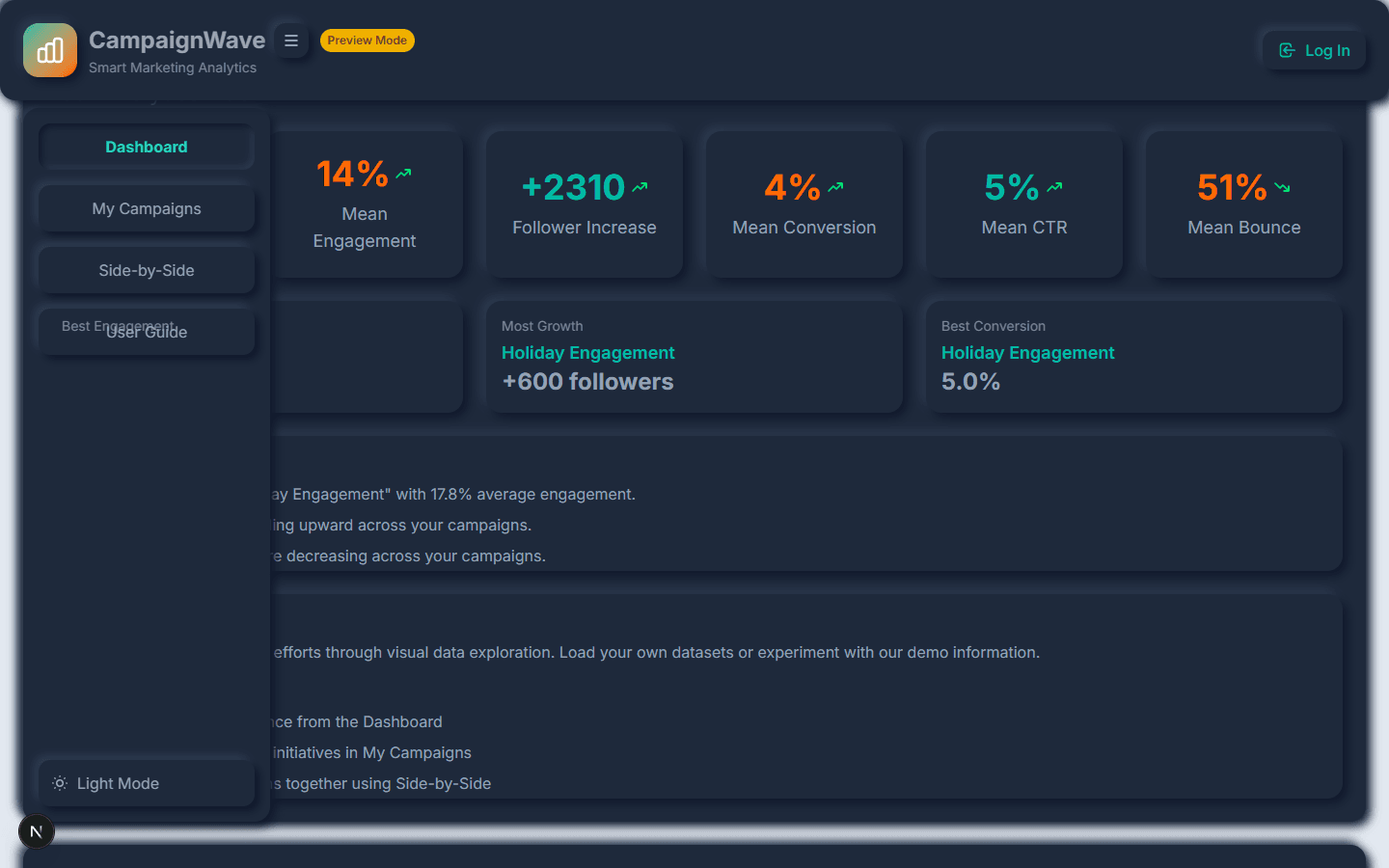
Dark theme using light colors, missing neumorphic shadows, cramped padding
After(Fixed)
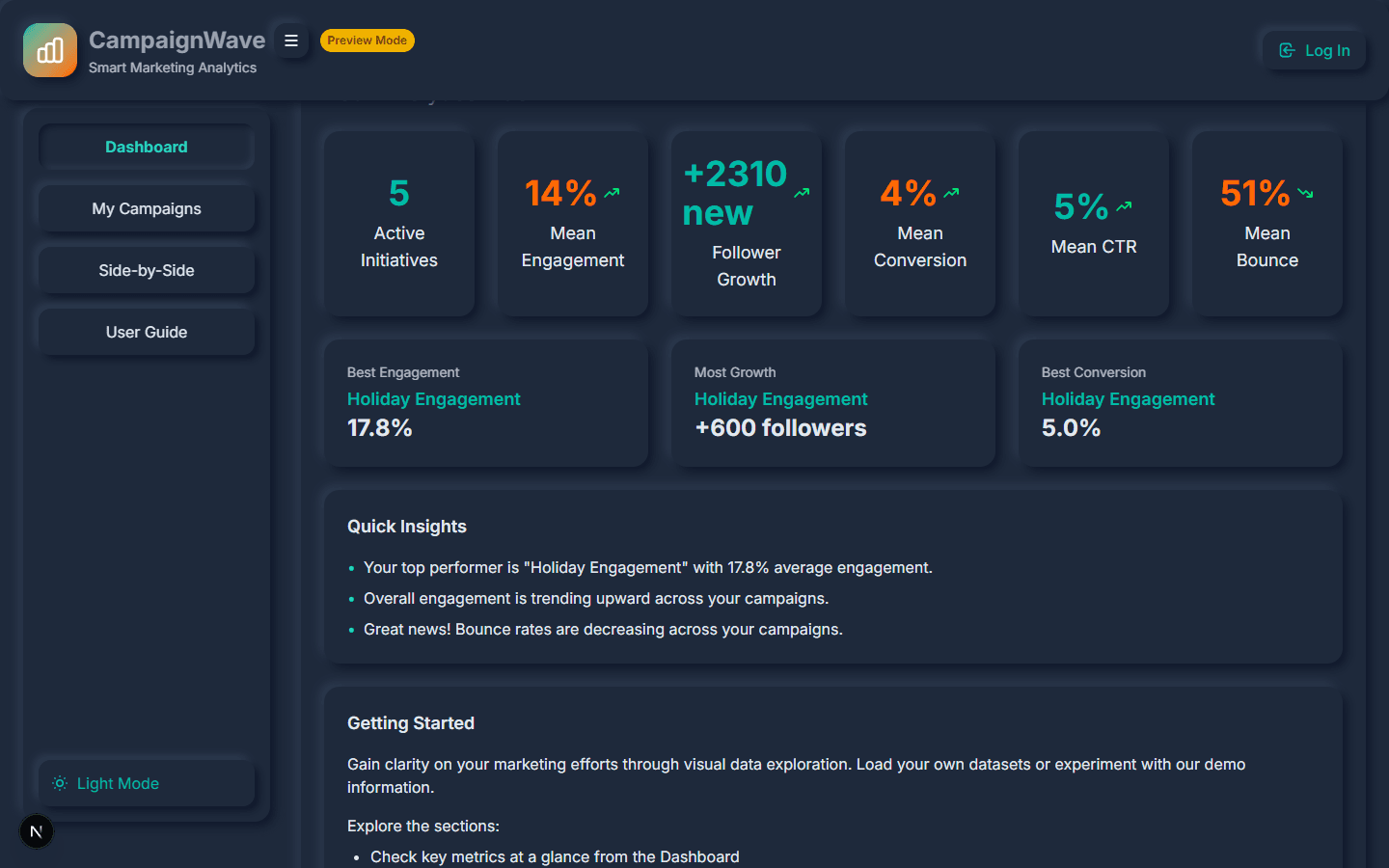
Proper dark colors restored, shadows fixed, improved spacing and z-index
1 / 4
Prompts Used
Deep Dive
I intentionally broke a working CampaignWave app with these 20 bugs:
- Theme Colors Swapped - Dark theme using light theme color values
- Navigation Overflow - Mobile nav items overflowing container
- Neumorphic Shadows Removed - Flat cards instead of soft shadows
- Card Padding Reduced - Content cramped with minimal padding (p-6 to p-1)
- Mobile Nav Direction - Horizontal nav in wrong flex direction
- Metrics Grid Mobile - 6-column grid on mobile (impossible to read)
- Header Flex Mobile - Header layout broken on small screens
- Sidebar Z-Index - Content overlapping the navigation
- Overflow Hidden - Content being clipped unexpectedly
- Chart Background - Charts with wrong background color
- Card Height Inconsistent - Cards with varying heights in grids
- Text Contrast Low - Gray text on gray background
- MiniChart Spacing - Charts touching card edges
- Trend Indicators - Missing plus/minus prefixes
- Theme Toggle Contrast - Button barely visible
- Slider Labels Missing - No min/max indicators on range slider
- Credential Display - Test login not highlighted
- ARIA Labels Missing - Screen reader inaccessible elements
- Menu Button Label - Hamburger menu with no accessible name
- Sign-In Handler - Early return causing silent login failure
Note: Bugs 2, 5, 6, and 7 were mobile-only and couldn't be detected with desktop viewport testing.
╔════════════════════════════════════════════════════════════╗
║         CampaignWave Visual QA Pipeline                    ║
╚════════════════════════════════════════════════════════════╝

PHASE 1: Screenshot Capture
━━━━━━━━━━━━━━━━━━━━━━━━━━━━━━━━━━━━━━━━━━━━━━━━━━━━━━━━━━━━
Base URL:    http://localhost:3000
Pages:       4 (overview, campaigns, compare, help)
Viewports:   1 (desktop)
Themes:      2 (dark, light)
Total:       8 screenshots

[1/8] Dashboard (dark)... ✓
[2/8] My Campaigns (dark)... ✓
[3/8] Side-by-Side (dark)... ✓
[4/8] User Guide (dark)... ✓
[5/8] Dashboard (light)... ✓
[6/8] My Campaigns (light)... ✓
[7/8] Side-by-Side (light)... ✓
[8/8] User Guide (light)... ✓

PHASE 2: AI Analysis
━━━━━━━━━━━━━━━━━━━━━━━━━━━━━━━━━━━━━━━━━━━━━━━━━━━━━━━━━━━━
Model: claude-sonnet-4-5-20250929

[1/8] Analyzing: overview-desktop-dark.png... Score: 47/100
[2/8] Analyzing: campaigns-desktop-dark.png... Score: 76/100
[3/8] Analyzing: compare-desktop-dark.png... Score: 52/100
[4/8] Analyzing: help-desktop-dark.png... Score: 68/100
[5/8] Analyzing: overview-desktop-light.png... Score: 71/100
[6/8] Analyzing: campaigns-desktop-light.png... Score: 79/100
[7/8] Analyzing: compare-desktop-light.png... Score: 61/100
[8/8] Analyzing: help-desktop-light.png... Score: 72/100

╔════════════════════════════════════════════════════════════╗
║               Pipeline Complete                            ║
╚════════════════════════════════════════════════════════════╝
   Score:        63/100
   Screenshots:  8
   Issues:       50
Duration: 4m 30s╔════════════════════════════════════════════════════════════╗
║ CampaignWave Visual QA Pipeline ║
╚════════════════════════════════════════════════════════════╝
PHASE 1: Screenshot Capture
━━━━━━━━━━━━━━━━━━━━━━━━━━━━━━━━━━━━━━━━━━━━━━━━━━━━━━━━━━━━
Base URL: http://localhost:3000
Total: 8 screenshots
[1/8] Dashboard (dark)... ✓
...
[8/8] User Guide (light)... ✓
PHASE 2: AI Analysis
━━━━━━━━━━━━━━━━━━━━━━━━━━━━━━━━━━━━━━━━━━━━━━━━━━━━━━━━━━━━
[1/8] Analyzing: overview-desktop-dark.png... Score: 78/100
[2/8] Analyzing: campaigns-desktop-dark.png... Score: 82/100
[3/8] Analyzing: compare-desktop-dark.png... Score: 75/100
[4/8] Analyzing: help-desktop-dark.png... Score: 79/100
[5/8] Analyzing: overview-desktop-light.png... Score: 80/100
[6/8] Analyzing: campaigns-desktop-light.png... Score: 81/100
[7/8] Analyzing: compare-desktop-light.png... Score: 72/100
[8/8] Analyzing: help-desktop-light.png... Score: 75/100
╔════════════════════════════════════════════════════════════╗
║ Pipeline Complete ║
╚════════════════════════════════════════════════════════════╝
Score: 77/100 (+14 from before)
Screenshots: 8
Issues: 47
Duration: 4m 15s╔════════════════════════════════════════════════════════════╗
║ CampaignWave Visual QA Pipeline ║
╚════════════════════════════════════════════════════════════╝
PHASE 1: Screenshot Capture
━━━━━━━━━━━━━━━━━━━━━━━━━━━━━━━━━━━━━━━━━━━━━━━━━━━━━━━━━━━━
Base URL: http://localhost:3000
Total: 16 screenshots (8 viewport + 8 scrolled)
[1/16] Dashboard (dark)... ✓
[2/16] Dashboard scrolled (dark)... ✓
...
[16/16] User Guide scrolled (light)... ✓
PHASE 2: AI Analysis
━━━━━━━━━━━━━━━━━━━━━━━━━━━━━━━━━━━━━━━━━━━━━━━━━━━━━━━━━━━━
[1/16] Analyzing: overview-desktop-dark.png... Score: 58/100
[2/16] Analyzing: overview-scrolled-dark.png... Score: 52/100
...
╔════════════════════════════════════════════════════════════╗
║ Pipeline Complete ║
╚════════════════════════════════════════════════════════════╝
Score: 59/100 (-18 from Phase 1)
Screenshots: 16
Issues: 98
Duration: 8m 45s
⚠️ Score dropped because scrolled captures revealed
additional issues not visible in viewport-only mode.╔════════════════════════════════════════════════════════════╗
║ CampaignWave Visual QA Pipeline ║
╚════════════════════════════════════════════════════════════╝
PHASE 1: Screenshot Capture
━━━━━━━━━━━━━━━━━━━━━━━━━━━━━━━━━━━━━━━━━━━━━━━━━━━━━━━━━━━━
Base URL: http://localhost:3000
Total: 16 screenshots (8 viewport + 8 scrolled)
All captures completed... ✓
PHASE 2: AI Analysis
━━━━━━━━━━━━━━━━━━━━━━━━━━━━━━━━━━━━━━━━━━━━━━━━━━━━━━━━━━━━
[1/16] Analyzing: overview-desktop-dark.png... Score: 62/100
...
╔════════════════════════════════════════════════════════════╗
║ Pipeline Complete ║
╚════════════════════════════════════════════════════════════╝
Score: 61/100 (+2 from Phase 2)
Screenshots: 16
Issues: 97
Duration: 8m 30s
📊 Summary:
- Started at 63/100, peaked at 77/100 (viewport only)
- Scrolled captures revealed more issues (59/100)
- Final score: 61/100 after fixes appliedKey Findings
Score Improved 63 to 77 in Phase 1
After fixing 5 critical and high priority issues identified by Claude Vision, the visual quality score improved by 14 points. The pipeline worked exactly as designed.
Scores Dropped When Scroll Captures Added
Phase 2 added scrolled screenshots, revealing 98 issues vs 47. The score dropped from 77 to 59. More visibility meant more problems - Claude Vision became harsher with more context.
Fresh Sessions Provide Better Context
Starting each major phase in a fresh Claude session allowed the AI to approach fixes without bias from previous attempts. The context window stayed clean and focused.
4 of 20 Bugs Were Mobile-Only
Desktop viewport testing has limits. 4 intentionally introduced bugs couldn't be detected because they only manifested on mobile breakpoints. Testing strategy matters.
Download Resources
Visual QA Pipeline Script
The main orchestration script that runs capture and analysis. 352 lines of JavaScript.
js13 KB
Screenshot Capture Script
Puppeteer script for automated screenshot capture across pages and themes.
js9 KB
Claude Vision Analysis Script
Sends screenshots to Claude Vision API and generates priority reports. 620 lines.
js20 KB
Before State Analysis Report
Full Visual QA report for the buggy version. Score: 63/100, Issues: 50
md25 KB
Phase 1 Analysis Report
Visual QA report after fixing critical/high issues. Score: 77/100, Issues: 47
md20 KB
Bug Introduction Prompt
The detailed prompt specifying all 20 bugs to introduce, organized by category with exact file paths and code changes.
md15 KB